
Apple Watch Strength Training: Which Metrics Actually Matter?
Apple Watch can preserve useful session context for lifting, but sets, reps, load, effort, and notes are what make a strength history actionable.
Apple Watch can preserve useful context for a strength session: when you trained, how long the session lasted, and activity signals collected during it. But those are not enough to explain whether a lift progressed. For that, your history still needs the exercise variation, sets, reps, load, effort, and any note that changed the set.
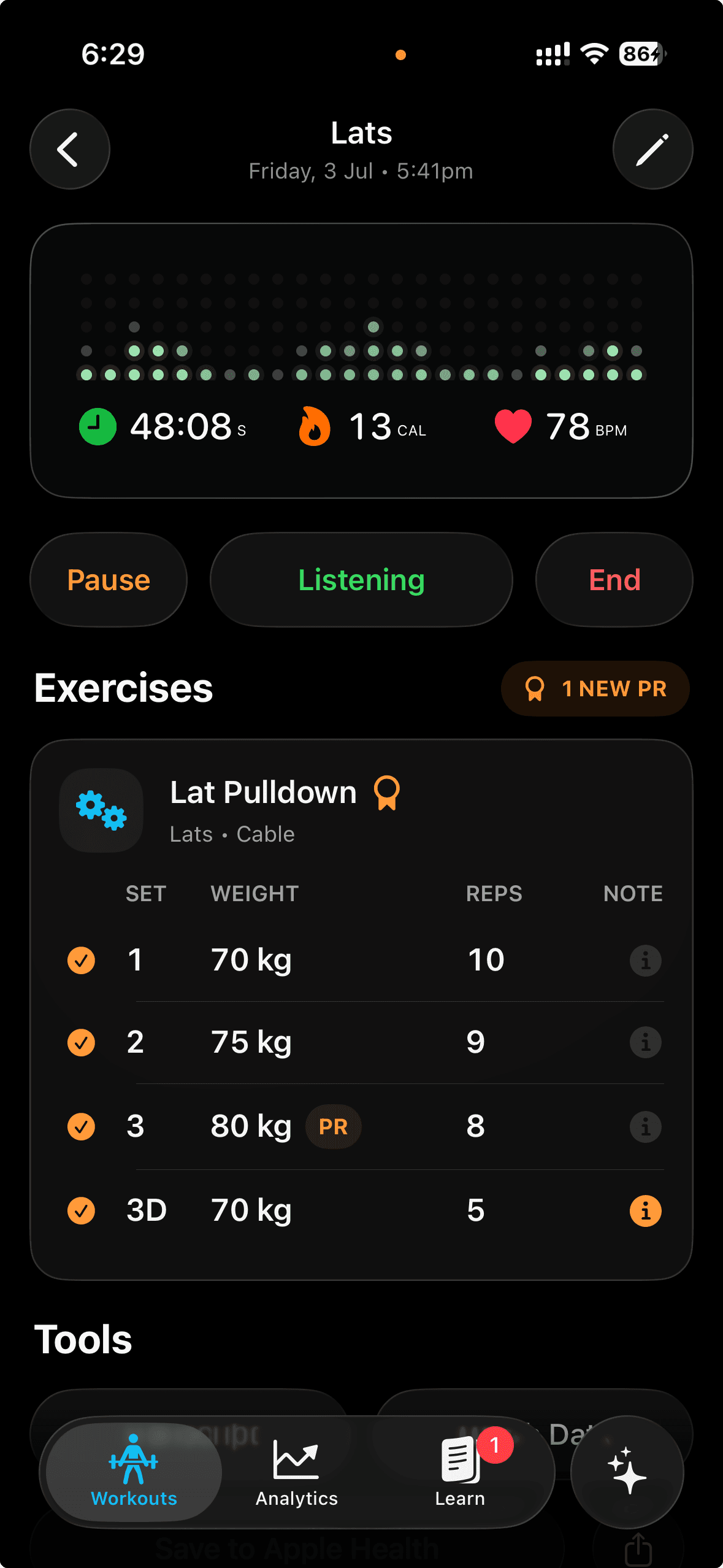
Apple’s Workout app documentation describes how the Watch manages sessions and surfaces workout history. That is a useful layer. A lifting journal is the second layer: it explains what you did inside the session and what it means for the next one.
Separate session metrics from performance metrics
Session metrics answer questions such as:
- How long was the workout?
- Was the session unusually compressed or extended?
- What did my Watch record during the session?
Performance metrics answer different questions:
- Which exercise variation did I use?
- What load and reps did I complete on each working set?
- How hard did the set feel?
- Did technique, rest, or equipment change the comparison?
Both matter, but they should not be confused. A higher heart rate does not prove a better strength session. A calorie estimate does not tell you whether to add weight to a lift. The most actionable signal is usually a comparable history of the lift itself.
The lifting fields worth keeping
For each working set, capture the exact variation, load, actual reps, and an effort marker. Add a note only when it changes how you interpret the result. “Cable station changed” or “short rest” can explain a difference that raw numbers cannot.
This is why the workout-journal guide treats context as part of the record, not decoration. A simple note can stop you from treating a different setup as a failed progression attempt.
Use Apple Watch where it is strongest
Apple Watch is strong at quick, glanceable capture. During a set-based workout, it can keep the current session visible without asking you to unlock your phone. Gyornal uses that surface for short set capture and then lets you review the larger session on iPhone.
The practical workflow is:
- Start one active session.
- Capture the completed set on the wrist.
- Confirm the latest exercise, load, and reps.
- Review the full record after the session.
The Apple Watch sets-and-reps guide walks through that workflow in detail. If you use voice to capture sets, pair it with the voice logging guide so the record stays quick without becoming opaque. In a noisy room, the hands-free workout tracking guide shows why confirmation and quick correction are part of a trustworthy record.
Effort makes the history more honest
Two sets with the same load and reps can mean different things. One may have been smooth with two reps left; another may have been a grind after a short rest. RPE or RIR is not a perfect measurement, but a consistent effort note makes your comparisons less naive.
Choose one effort scale and use it the same way across sessions. The RPE versus RIR guide explains the practical difference. The point is not to create false precision; it is to remember whether the result was repeatable.
Judge trends, not isolated readings
Strength progress is easier to see across comparable sessions than in one workout summary. Review the last few exposures to a lift and ask whether load, reps, execution, or effort has moved in a useful direction. If it has not, the next action may be to repeat, adjust rest, simplify the variation, or reduce fatigue—not automatically add weight.
That approach is the foundation of tracking progressive overload without a spreadsheet. Watch metrics can support the story; they should not overwrite it.
The useful standard
Use your Apple Watch to preserve the session and keep your phone out of the active-set flow. Use a structured log to preserve the details that let you make a better decision next time. Together, those two layers turn a session from a ring-closing event into a history you can train from.
Explore Gyornal to keep your Watch, iPhone, sets, notes, and post-session review connected in one workout record.
Keep reading
More practical guides for building a workout history you can use.
How to Log Sets and Reps on Apple Watch Without Your Phone
A practical Apple Watch workflow for keeping exercise, sets, reps, load, and notes in your lifting history while your phone stays out of the way.
Read articleHands-Free Workout Tracking in a Loud Gym: What Actually Works
Voice workout logging can work in a noisy gym when capture is brief, confirmation is visible, and corrections are easier than pretending every transcript is perfect.
Read articleHow to Keep a Workout Journal That Actually Helps You Progress
A practical strength-training journal system for recording sets, reps, effort, notes, and the next decision without turning your workout into admin.
Read article