
How to Log Sets and Reps on Apple Watch Without Your Phone
A practical Apple Watch workflow for keeping exercise, sets, reps, load, and notes in your lifting history while your phone stays out of the way.
You can start a strength workout on Apple Watch and keep the iPhone out of your active-set flow. The useful distinction is this: Apple’s Workout app records the workout session and health signals, while a strength journal needs exercise-level sets, reps, load, effort, and notes. A good wrist workflow keeps both jobs clear.
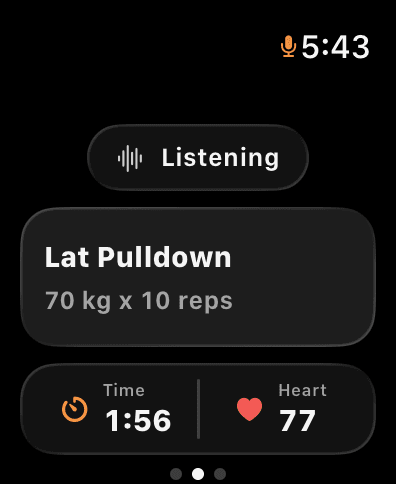
Apple documents that its Workout app can manage a session and summarize workout history in Fitness. For lifting, that is valuable session context. But “traditional strength training” alone does not tell you whether your pulldown was 70 kg for 10 or 80 kg for 8 with a technique note. That is the gap a workout journal should fill.
Start the session before the first work set
Open Gyornal on iPhone or Apple Watch and begin the session you are actually training. Confirm the split or session name before the warm-up ends. The goal is not to build a complicated plan on your wrist. It is to establish one active session that both devices can refer to.
Once the session is active, keep your phone in a safe place. The Watch is best for quick capture and glanceable confirmation; the iPhone is better for reviewing a longer transcript, editing a complex note, or looking at the full session afterward.
Speak the smallest complete set
For most working sets, use a short phrase:
- “Lat pulldown, 70 kilos for 10.”
- “Same weight, 9 reps.”
- “80 kilos for 8, controlled stretch.”
Short phrases are easier to say, easier to confirm, and less likely to interrupt a rest period. The watch should show you the latest exercise, load, and reps before you move on. If it is wrong, correct it while the set is still fresh. That correction is part of the training record, not a failure of the workflow.
For more on phrasing and confirmation, read why voice-first workout logging sticks. If your gym is loud or the mic cannot hear you clearly, the hands-free workout tracking guide explains when a quick manual correction is the better call.
Record context only when it changes the next decision
The Watch does not need to become a diary. Add a note when it changes how you compare the set later:
- “Smith machine was taken.”
- “Grip slipped on the final rep.”
- “Short rest; rack was busy.”
These notes make the history more honest. A lower rep count after an equipment change is not necessarily a regression. The guide to what to write in a workout journal has a simple rule: record the detail if it changes the interpretation or the next target.
Review the session on iPhone
When you finish, review the session on the larger screen. Check the exercise list, the sets, and any notes you captured. Then make a next-session decision: add a rep, repeat the load, change the target, or keep the same prescription with a clearer cue.
That review step is why wrist logging can be useful without pretending the Watch is the best surface for every task. Apple Watch is the capture surface. Your full history is the decision surface.
What Apple Watch metrics matter during lifting?
Duration and heart rate can add context, especially when rest periods or session density changed. They are not a replacement for exercise-level information. Calories or a single heart-rate value should not decide whether you add weight to a lift.
Use the Watch to preserve the session; use sets, reps, load, and effort to judge lifting performance. See Apple Watch strength-training metrics that matter for a practical breakdown.
A simple wrist-first workflow
- Start the session from iPhone or Apple Watch.
- Speak or enter the completed set, not the ideal set.
- Confirm the latest exercise, load, and reps on the wrist.
- Add a short note only when context matters.
- Review the completed session on iPhone.
- Write one next-session target in your history.
That is enough to keep your phone out of the way without losing the record that makes training measurable.
Keep the record useful
Gyornal is in early beta, so verify the current device behavior in the app before relying on a workflow in a competition, medical, or safety-sensitive setting. For ordinary strength sessions, the useful standard is simpler: did the record preserve what you did well enough to guide the next session?
Explore Gyornal to start a session on iPhone, keep it moving on Apple Watch, and review it later with the full context intact.
Keep reading
More practical guides for building a workout history you can use.
Apple Watch Strength Training: Which Metrics Actually Matter?
Apple Watch can preserve useful session context for lifting, but sets, reps, load, effort, and notes are what make a strength history actionable.
Read articleHands-Free Workout Tracking in a Loud Gym: What Actually Works
Voice workout logging can work in a noisy gym when capture is brief, confirmation is visible, and corrections are easier than pretending every transcript is perfect.
Read articleStop Typing Between Sets: Why Voice-First Logging Actually Sticks
Voice workout logging keeps lifters consistent because it removes the friction of typing between sets. Learn how Gyornal turns speech into structured gym data on iPhone and Apple Watch.
Read article