
Hands-Free Workout Tracking in a Loud Gym: What Actually Works
Voice workout logging can work in a noisy gym when capture is brief, confirmation is visible, and corrections are easier than pretending every transcript is perfect.
Hands-free workout tracking works best when it does not ask voice to do everything. In a loud gym, the reliable pattern is short capture, visible confirmation, and a fast correction path. Speak the completed set, check what the app understood, then get back to training.
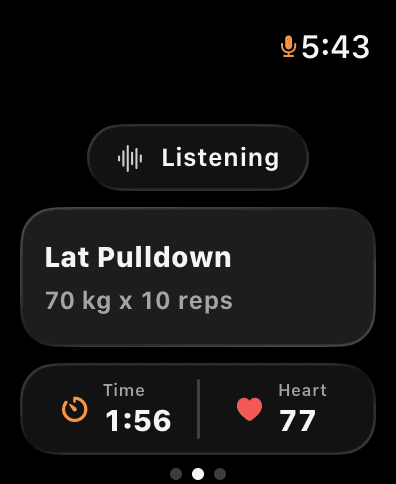
This is a better standard than claiming that a workout tracker will hear every word perfectly around music, bars, and other people. The record has to stay auditable. If the app hears “70 kilos for 10” when you said “75,” you need to see the mismatch before it becomes your training history.
Use the shortest phrase that contains the set
The most useful spoken entry normally has four parts: exercise, load, reps, and an optional note.
- “Bench press, 70 kilos for 8.”
- “Same weight, 7 reps.”
- “Lat pulldown, 80 for 8, no jerking.”
You do not need full sentences. Extra wording creates more opportunities for a noisy environment to interfere. If the exercise has not changed, “same weight, 9 reps” is often enough.
The point is not to replace thought with dictation. It is to remove the keyboard from the part of training where your hands, attention, and rest clock are already busy. That is the core of voice-first workout logging.
Confirm before the next set
Voice capture is only useful when you can verify it. A good confirmation screen shows the latest exercise, load, and rep count. Look at it before you start the next set. If it is wrong, correct it immediately while you still remember what happened.
This makes a transcript useful even when it is imperfect: you can see what was said, what the system understood, and what changed. Over time, that transparency matters more than a magical-sounding accuracy claim.
Put the microphone where the workflow works
Your phone may be practical for a long note or a fuller session view. Your Apple Watch is often more practical for a brief set capture because it is already on your wrist. The Apple Watch sets-and-reps workflow shows how to treat the Watch as the fast capture surface and the phone as the review surface. Use the Apple Watch strength-training metrics guide to separate session context from the lift data that should drive progression.
Neither location solves every gym. If the room is too loud, move closer to the microphone, use the shortest phrase possible, or enter the correction manually. A fast fallback is a feature, not a concession.
Record context, not a monologue
Short notes are where hands-free logging becomes a journal rather than a tally:
- “Grip slipped.”
- “Short rest; rack busy.”
- “Controlled stretch.”
- “Right knee felt off; reduced load.”
Those notes matter because they change the next-session decision. They should not be used to diagnose pain or prescribe treatment. If a symptom concerns you, stop and seek appropriate qualified guidance.
For a clearer rule about what is worth saving, see what to write in a workout journal.
Test the workflow honestly
Before you depend on any voice tracker, test it with your own language and gym conditions:
- Log three common lifts in a quiet space.
- Repeat the same phrases at your normal gym volume.
- Check the exercise, load, reps, and notes after every entry.
- Note which phrases need less ambiguity.
- Keep a manual correction path ready.
The useful outcome is not a percentage. It is a workflow you trust enough to use consistently. Once your captured sets are reliable, your workout journal can preserve the context needed to review progress later.
Voice is capture, not the whole training system
Voice is strongest during active training. Planning, longer edits, and weekly review are usually better on the phone. Gyornal keeps those jobs connected: speak sets when pace matters, review the structured session afterward, and use the history to make a grounded next-session choice.
Explore Gyornal if you want a gym log that gets out of the way while the set is still happening.
Keep reading
More practical guides for building a workout history you can use.
How to Log Sets and Reps on Apple Watch Without Your Phone
A practical Apple Watch workflow for keeping exercise, sets, reps, load, and notes in your lifting history while your phone stays out of the way.
Read articleStop Typing Between Sets: Why Voice-First Logging Actually Sticks
Voice workout logging keeps lifters consistent because it removes the friction of typing between sets. Learn how Gyornal turns speech into structured gym data on iPhone and Apple Watch.
Read articleApple Watch Strength Training: Which Metrics Actually Matter?
Apple Watch can preserve useful session context for lifting, but sets, reps, load, effort, and notes are what make a strength history actionable.
Read article